Installation
The agent currently supports Linux (armv5, armv6, armv7, arm64 and amd64) and Windows (only amd64). The binaries are made available through github releases.
You can also compile it from sources (once you have have a go compiler >=1.18):
go install github.com/situation-sh/situation/agent
Quick run
You can run the agent without data persistence (in-memory database)
situation run
situation.exe run
If you want to output an sqlite database, just add the --db flag
situation run --db=situation.sqlite
situation.exe run --db=situation.sqlite
Exploring (experimental)
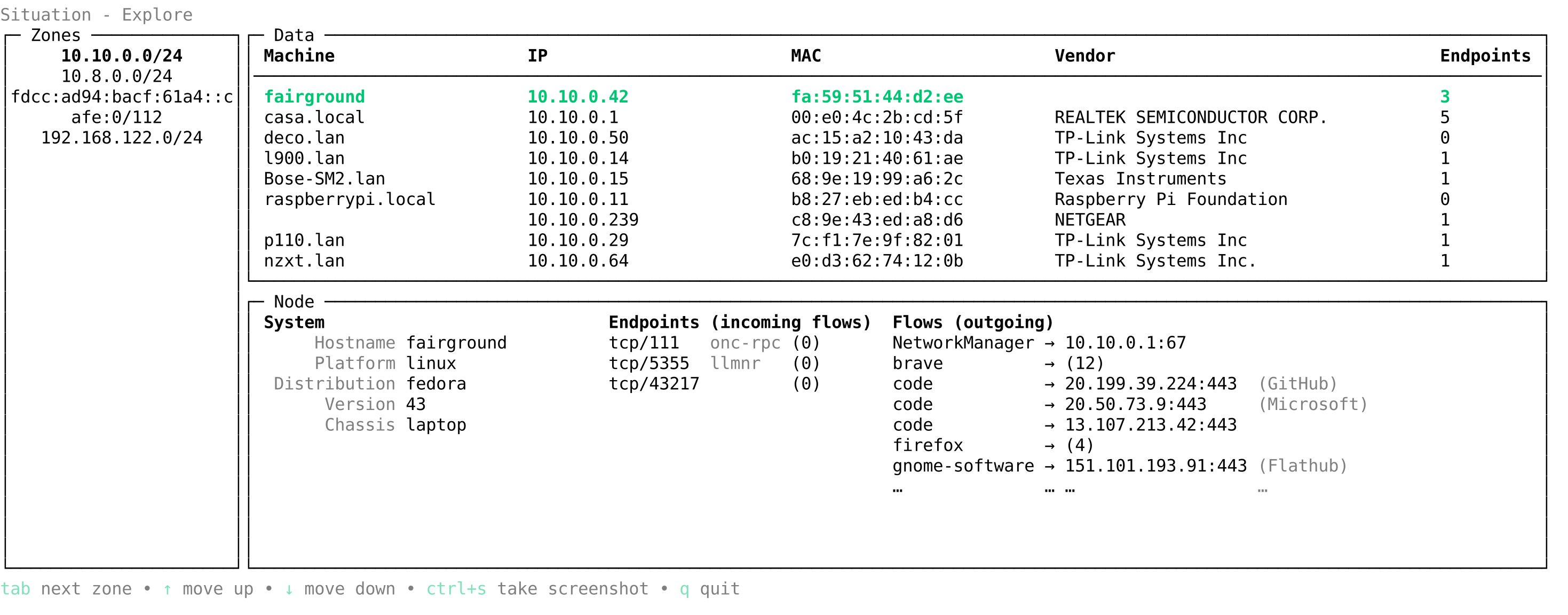
Situation embeds a minimal terminal ui (tui) that briefly shows the collected data. It can pop up after the run with the --explore flag,
situation run --explore
situation.exe run --explore
or the explore command can also be used in case of data persistence
situation explore --db=situation.sqlite
situation.exe explore --db=situation.sqlite
Cooperation
Here is where the IT data collection platform starts! You can let the agents cooperate by providing them a common postgres database:
situation run --db=postgresql://[user]:[password]@[host]:[port]/[database]
situation.exe run --db=postgresql://[user]:[password]@[host]:[port]/[database]